
How to order
-
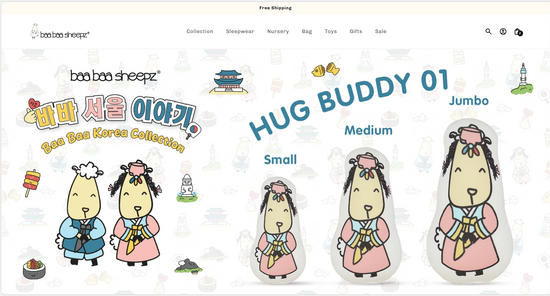
1. Select Product
Click "Collection" or browse through the top navigation categories (such as Sleepwear, Nursery, Bag, Toys, or Gifts). Select the product you are interested in by clicking on it to view complete descriptions and detailed images.
-
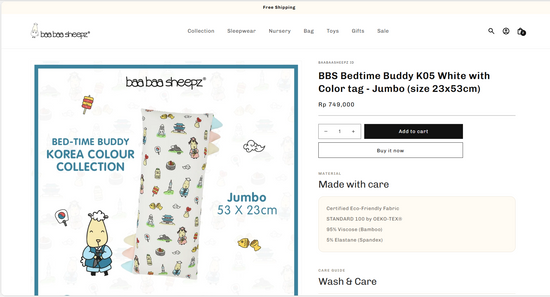
2. Add to Shopping Cart
On the product page, select your desired quantity using the - or + buttons, then click Add to cart. Alternatively, click Buy it now to proceed directly to checkout.
-
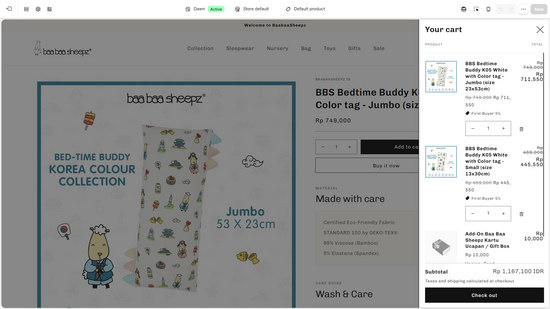
3. Review Cart
Click the shopping bag icon at the top-right corner to open "Your cart" drawer. Review your selected items, adjust quantities, or remove items using the trash icon. Verify your Subtotal, then click Check out to proceed.
-
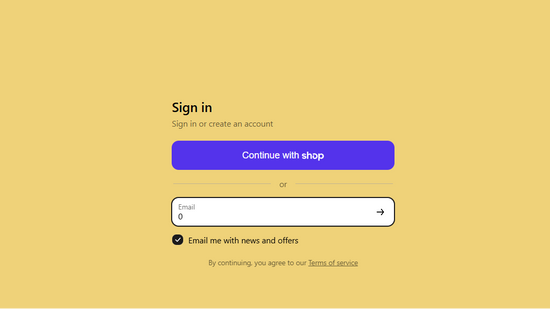
4. Sign In for Member Benefits
Sign in or create an account by entering your Email address, or click Continue with shop for a faster login. Signing in allows you to track orders and enjoy member benefits. You can also check the option to receive news and exclusive offers.
-
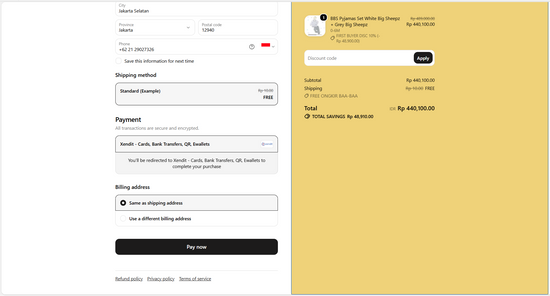
5. Checkout & Review Your Order
Fill in your delivery details, select your shipping and payment options, and apply promo codes in the Discount code field. Double-check your final total on the right summary section, then click Pay now to finish your purchase.
-
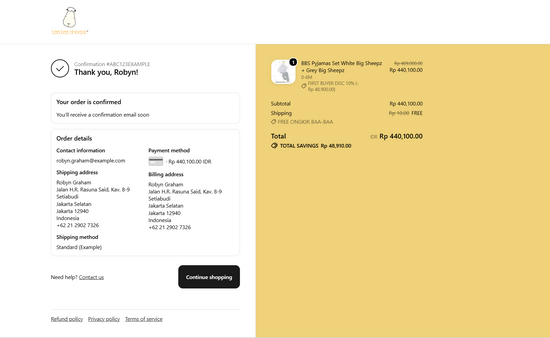
6. Order Confirmation
Once your payment is complete, you will see the "Thank you" confirmation page containing your order number and summary details. A confirmation email will also be sent to your inbox. Click Continue shopping to return to the store.
